Cloud Integration
For many customers, automation is only truly valuable once it is connected to cloud storage, company data, and collaboration workflows. Roughly half of the projects we deliver include some form of server-side processing, web integration, or data synchronization—so the solution fits naturally into day-to-day operations.
Autodesk Platform Services (APS) & Design Automation
Autodesk Platform Services (APS) (formerly Autodesk Forge) is Autodesk's cloud developer platform for automation, data access, and visualization.
APS Design Automation lets us run Autodesk engines in the cloud to process models without a desktop UI, which is ideal for batch and backend tasks such as drawing and output generation, parameter updates, data extraction, and repeatable model transformations.

Automated, post-processed PDF drawing exports in AutoCAD using Design Automation. Learn more in the Insights section.
At the time of writing, the Design Automation / Automation APIs support cloud processing across a set of core Autodesk engines. Below is a high-level view of commonly supported products.
 Revit
Revit AutoCAD
 Inventor
 Fusion 360
 3ds Max
APS for Construction Cloud (BIM 360 / ACC)
If you are thinking "APS = BIM 360," you are very close. A simple way to think about it:
- BIM 360 is the legacy branding many teams still use.
- Today it lives under Autodesk Construction Cloud (ACC), and Autodesk provides ACC/BIM 360 APIs for integrating project data and workflows into custom apps.
With ACC/BIM 360 APIs we commonly build integrations around:
- Project & file workflows – connecting document management to your internal systems.
- Issues – creating and updating issues, syncing status, and attaching references and comments.
- Workflow automation – triggering actions when data changes, and connecting with ERP or QA systems.
On top of that, APS also provides core building blocks for cloud apps such as:
- Model translation + metadata extraction – converting files for web viewing and extracting properties and hierarchies.
- Web-based 2D/3D visualization via the APS Viewer workflow.

Using APS APIs, we can place pushpin-style markers within Autodesk Viewer directly on model geometry to communicate issues, decisions, and comments with team members in context.
Femsolve Cloud Services
In partnership with Femsolve Kft., we developed a cloud framework that can perform complex computations on models, modify them, and visualize results in a 3D environment. When clients need a vendor-independent solution with maximum flexibility, this is the toolset we typically recommend.
Femsolve 3D Viewer
The 3D Viewer is designed for lightweight visualization of engineering data and can be embedded into websites without requiring a dedicated backend for basic use cases. It is a strong fit for product pages, configurators, reporting dashboards, and lightweight review experiences.
The Viewer can also be integrated with your existing systems. For example, collaboration "pushpins" (chat boxes, comments, tasks) can be loaded from an external database and placed on geometry surfaces at runtime—while webhooks keep your source of truth in sync.

Example of floating collaboration chat boxes and tasks pinned to geometry surfaces in a browser-based 3D viewer.
Femsolve 3D Editor
Unlike the Viewer, the 3D Editor supports advanced modeling operations and is backed by a compute container called the Femsolve Model Service. Even when we develop fully headless services, we often use the Editor during implementation to validate geometry operations and speed up iteration.
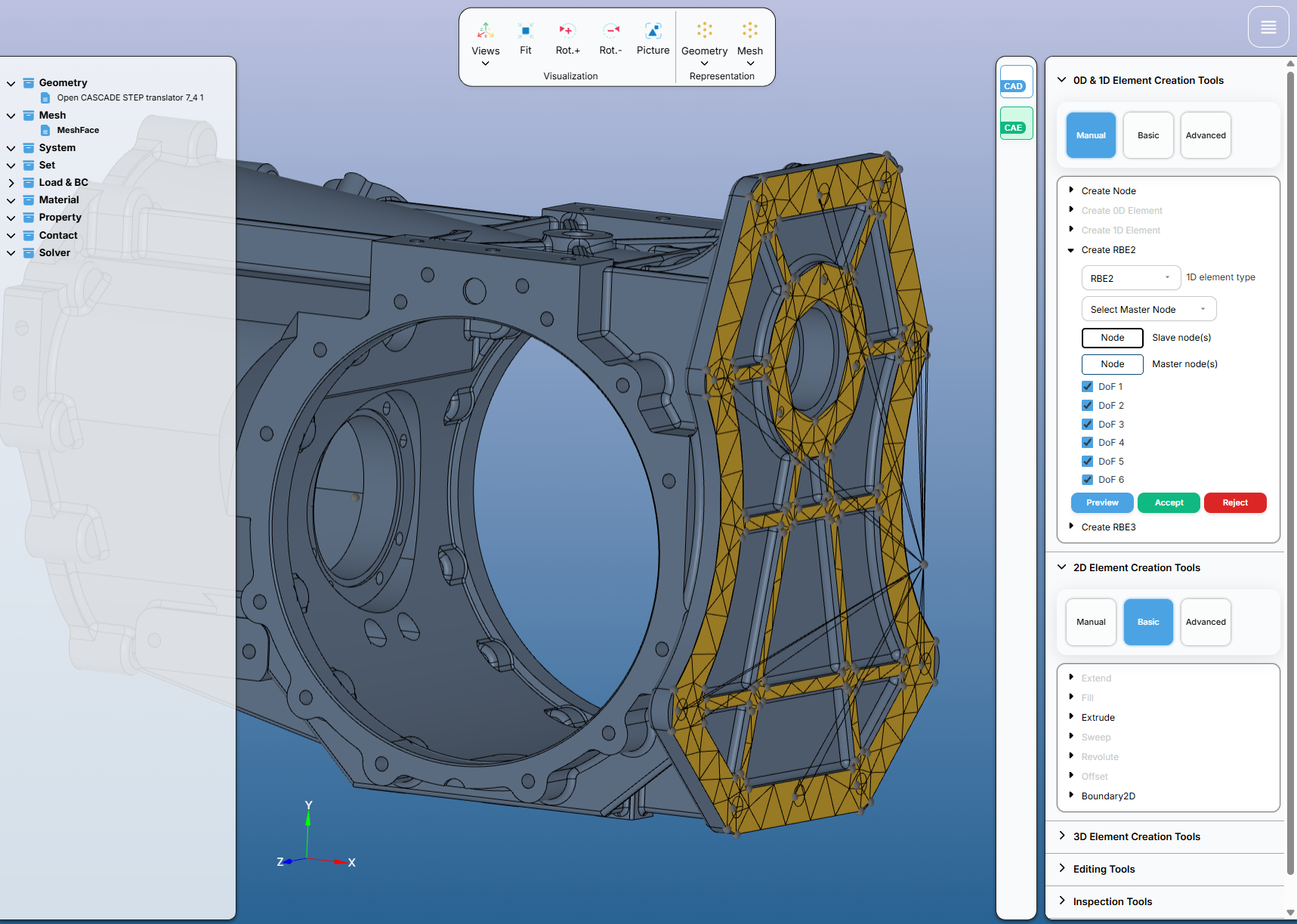
Femsolve Editor 3D, primarily built for complex modelling, allows us to build 3D algorithms faster using its existing toolset directly in the browser.
An industry specific example is using the Editor to create runners and gates on injection molding parts. The Editor's robust geometry kernel allows us to create and modify CAD models directly in the browser, while the Model Service performs complex operations such as Boolean cuts and loft geometry extrusions.

Input specification within the 3D editor to generate runner for metal injection of molded parts.
If you are exploring how to bring your workflows to the cloud—whether through APS, Femsolve, or a hybrid of both—we can help you evaluate options and design a solution that fits your environment.
For a broader view of our automation and integration work across desktop and web, see the Services page.